





Easily add dynamic content to your menus with the Shortcode in Menus plugin.
WordPress’ menu system is nice in a lot of ways. It’s intuitive and it’s simple. But it’s also limited. As a web developer, so many opportunities could be opened up with just the ability to drop some custom code into a menu item. For instance, you could automatically add recent posts from a custom post type as sub menu items.
Thanks to Gagan Deep Singh’s Shortcode in Menus plugin, this is now possible! For our example, we’ll first write a custom shortcode that outputs the three most recent posts from a custom post type called ‘news’:
// Shortcode the returns recent news items as submenu items

function recent_news_submenu_func( $atts ){
	$a = shortcode_atts( array(
	), $atts );

	$args = array(
		'post_type' => 'news',
		'posts_per_page' => 3,
		'orderby' => 'date',
		'order' => 'DESC',
	);
	$query = new WP_Query( $args );

	// The Loop
	$output = "";
	if ( $query->have_posts() ) {
		$output .= "<ul class='submenu'>";
		while ( $query->have_posts() ) {
			$query->the_post();
			$output .= "<li class='menu-item'><a href='" . get_the_permalink() . "'>" . get_the_title() . "</a></li>";
		}
		$output .= "</ul>";
	} else {
		// no posts found
	}
	/* Restore original Post Data */
	wp_reset_postdata();

	return $output;
}
add_shortcode( 'recent-news-submenu', 'recent_news_submenu_func' );
Now that we have our shortcode, we can add it to our menu using the new “Shortcode” menu item type. Simply add the shortcode as the menu item’s description:
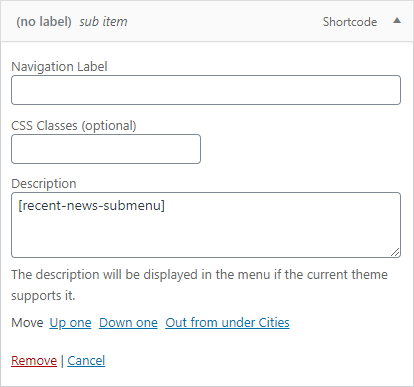
And we’re all set!
Have you found any fun and interesting ways to use this plugin on your site? Leave us a comment below, we’d love to hear about it!